Sunday, August 30, 2009
Tuesday, August 25, 2009
Google Traffic: The bright side of sitting in traffic.
The bright side of sitting in traffic: Crowdsourcing road congestion data: "This post is the latest in an ongoing series about how we harness the data we collect to improve our products and services for our users. It is cross-posted from the Official Google Blog. - Ed.
What if you could do a little something to improve the world during your daily drive to work? Here are a few ideas: tell everybody in the city when you're stuck in slow-moving traffic; warn the drivers on the freeway behind you that they should consider an alternate route; tell the people still at home that they should spend another ten minutes reading the morning news before they leave for work; tell your city government that they might want to change the timing of that traffic light at the highway on-ramp. Of course, you can't just get on the phone and call everybody, and your one traffic report from your one spot on the road might not help much anyway. But if everybody on the road, all at once, could tell the world how fast their car is moving, and we could make it easy for anybody to check that information on their computer or cell phone, well — then we'd be getting somewhere.
If you use Google Maps for mobile with GPS enabled on your phone, that's exactly what you can do. When you choose to enable Google Maps with My Location, your phone sends anonymous bits of data back to Google describing how fast you're moving. When we combine your speed with the speed of other phones on the road, across thousands of phones moving around a city at any given time, we can get a pretty good picture of live traffic conditions. We continuously combine this data and send it back to you for free in the Google Maps traffic layers. It takes almost zero effort on your part — just turn on Google Maps for mobile before starting your car — and the more people that participate, the better the resulting traffic reports get for everybody.

This week we're expanding our traffic layer to cover all U.S. highways and arterials when data is available. We're able to do this thanks in no small part to the data contributed by our users. This is exactly the kind of technology that we love at Google because it's so easy for a single person to help out, but can be incredibly powerful when a lot of people use it together. Imagine if you knew the exact traffic speed on every road in the city — every intersection, backstreet and freeway on-ramp — and how that would affect the way you drive, help the environment and impact the way our government makes road planning decisions. This idea, which we geeks call 'crowdsourcing,' isn't new. Ever since GPS location started coming to mainstream devices, people have been thinking of ways to use it to figure out how fast the traffic is moving. But for us to really make it work, we had to solve problems of scale (because you can't get useful traffic results until you have a LOT of devices reporting their speeds) and privacy (because we don't want anybody to be able to analyze Google's traffic data to see the movement of a particular phone, even when that phone is completely anonymous).
We achieve scale by making Google Maps for mobile easy to install and use, and by making it easy for people to provide information about their own vehicle speed. There's no extra device to plug into your car and no extra software to buy. Google Maps is free and works with most cell phones, and the number of cell phones with GPS is rising every day. Some phones, such as the T-Mobile myTouch 3G and the Palm Pre, come with Google Maps and traffic crowdsourcing pre-installed (the iPhone Maps application, however, does not support traffic crowdsourcing). Google is fortunate to have a lot of people using our products, and that scale helps make our products better.
We've already been able to provide useful traffic information with the help of our existing mobile users, but we hope that is just the start. As GPS-enabled phones and data plans get less expensive, more people will be able to participate. Crowdsourcing traffic gives us a way to harness bits of location data from our users and give it back to them in a form they can use to make impactful decisions that affect their free time, their pocketbooks and the environment. The more people use it, the better it will get. So next time you're sitting in morning traffic, turn on Google Maps for mobile and let someone else know they can hit the snooze button one more time. Tomorrow morning, they might do the same for you.
Posted by Dave Barth, Product Manager for Google Maps.

What if you could do a little something to improve the world during your daily drive to work? Here are a few ideas: tell everybody in the city when you're stuck in slow-moving traffic; warn the drivers on the freeway behind you that they should consider an alternate route; tell the people still at home that they should spend another ten minutes reading the morning news before they leave for work; tell your city government that they might want to change the timing of that traffic light at the highway on-ramp. Of course, you can't just get on the phone and call everybody, and your one traffic report from your one spot on the road might not help much anyway. But if everybody on the road, all at once, could tell the world how fast their car is moving, and we could make it easy for anybody to check that information on their computer or cell phone, well — then we'd be getting somewhere.
If you use Google Maps for mobile with GPS enabled on your phone, that's exactly what you can do. When you choose to enable Google Maps with My Location, your phone sends anonymous bits of data back to Google describing how fast you're moving. When we combine your speed with the speed of other phones on the road, across thousands of phones moving around a city at any given time, we can get a pretty good picture of live traffic conditions. We continuously combine this data and send it back to you for free in the Google Maps traffic layers. It takes almost zero effort on your part — just turn on Google Maps for mobile before starting your car — and the more people that participate, the better the resulting traffic reports get for everybody.
This week we're expanding our traffic layer to cover all U.S. highways and arterials when data is available. We're able to do this thanks in no small part to the data contributed by our users. This is exactly the kind of technology that we love at Google because it's so easy for a single person to help out, but can be incredibly powerful when a lot of people use it together. Imagine if you knew the exact traffic speed on every road in the city — every intersection, backstreet and freeway on-ramp — and how that would affect the way you drive, help the environment and impact the way our government makes road planning decisions. This idea, which we geeks call 'crowdsourcing,' isn't new. Ever since GPS location started coming to mainstream devices, people have been thinking of ways to use it to figure out how fast the traffic is moving. But for us to really make it work, we had to solve problems of scale (because you can't get useful traffic results until you have a LOT of devices reporting their speeds) and privacy (because we don't want anybody to be able to analyze Google's traffic data to see the movement of a particular phone, even when that phone is completely anonymous).
We achieve scale by making Google Maps for mobile easy to install and use, and by making it easy for people to provide information about their own vehicle speed. There's no extra device to plug into your car and no extra software to buy. Google Maps is free and works with most cell phones, and the number of cell phones with GPS is rising every day. Some phones, such as the T-Mobile myTouch 3G and the Palm Pre, come with Google Maps and traffic crowdsourcing pre-installed (the iPhone Maps application, however, does not support traffic crowdsourcing). Google is fortunate to have a lot of people using our products, and that scale helps make our products better.
We understand that many people would be concerned about telling the world how fast their car was moving if they also had to tell the world where they were going, so we built privacy protections in from the start. We only use anonymous speed and location information to calculate traffic conditions, and only do so when you have chosen to enable location services on your phone. We use our scale to provide further privacy protection: When a lot of people are reporting data from the same area, we combine their data together to make it hard to tell one phone from another. Even though the vehicle carrying a phone is anonymous, we don't want anybody to be able to find out where that anonymous vehicle came from or where it went — so we find the start and end points of every trip and permanently delete that data so that even Google ceases to have access to it. We take the privacy concerns related to user location data seriously, and have worked hard to protect the privacy of users who share this data — but we still understand that not everybody will want to participate. If you'd like to stop your phone from sending anonymous location data back to Google, you can find opt-out instructions here.
We've already been able to provide useful traffic information with the help of our existing mobile users, but we hope that is just the start. As GPS-enabled phones and data plans get less expensive, more people will be able to participate. Crowdsourcing traffic gives us a way to harness bits of location data from our users and give it back to them in a form they can use to make impactful decisions that affect their free time, their pocketbooks and the environment. The more people use it, the better it will get. So next time you're sitting in morning traffic, turn on Google Maps for mobile and let someone else know they can hit the snooze button one more time. Tomorrow morning, they might do the same for you.
Posted by Dave Barth, Product Manager for Google Maps.
Sunday, August 23, 2009
Thunder Hole where as many as 20 people were swept out to sea today in Acadia National Park Maine

A 7 year old girl has died after a wave swept her off the rocks here today. (this is a photo from a few years ago.)
11 of these victims have broken bones and the Coast Guard believes there are other victims still in the water yet to be identified as missing.
Now, I get it: You want to hear the THUNDER at Thunder Hole, but come on, don't actually GO DOWN there with a 7 year old.
Sunday, August 16, 2009
Backup and Search Your Friends' Tweets with Google Reader [Twitter]
Backup and Search Your Friends' Tweets with Google Reader [Twitter]: "


 "
"

First, though, why would you want to do this? The native search tool provided by Twitter only tunnels back about a week and a half. Anything beyond that is lost in the ether. Thanks to a handy little tool created by Dave Winer, you can turn your follower list into an RSS feed and import that feed into Google Reader, which turns the data from the Twitter feeds into a search-friendly mountain of feed items. How do you do it? From ReadWriteWeb:
It couldn't be much simpler. Just put your Twitter username into this link, instead of mine, and load it up in your browser: http://tw.opml.org/get?user=marshallk&folder=1
It may take just a minute, but the end result will be an OPML file. You can either go up to your browser's File menu and select 'save as' or you can View Source and copy and paste the source of the page into a text document. Save it with a memorable name and either .xml or .opml as the file type. It's really quite easy.
Now if you want to put this puppy into Google Reader just log in, click on 'manage subscriptions' and find the import/export button. Import that file into Google Reader and you're ready to rock and roll!
In our test of the service, we were able to mine all sorts of things from the feed we created. How much did our band of followers talk about Texas? Quite a bit more than we expected. Check out the full article at the link below for additional information or use the technique quoted above to jump right in. Have a favorite Twitter-centric hack of your own? Share it in the comments.
"
Thursday, August 13, 2009
A flurry of features for feed readers
A flurry of features for feed readers: "


 "
"
Since our last big launch, we've been thinking about ways to help our users better share, discover, and consume content in Reader. Today, I'm happy to announce several new features that we hope will further improve the way you use Reader.
Send to...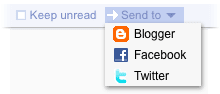 We've made it easier to share posts you like to Blogger, Twitter, Facebook, and more, with our new 'Send to' feature. (Incidentally, Blogger is celebrating its tenth birthday this month, and we're hoping our friends there will like this little birthday present.)
Just head over to the settings page, and enable the services you want to use. If your favorite service isn't listed (and you're feeling extra geeky), you can create your own 'Send to' link with a URL template.

To share an item on one of your sites, simply click the 'Send to' button and choose your service. If you're into keyboard shortcuts, 'shift-t' will do the same.
Feeds from people you follow
When we added following, we tried to make it easier to find and follow people who share similar interests. Now we've gone even further, and made it possible for you to subscribe directly to the blogs, photos, or Twitter updates that anyone you're following has included on their Google profile.

To quickly subscribe to these sites, click the 'From people you follow' tab on the 'Browse for stuff' page.
More control for mark all as read We know people can be overwhelmed by too many unread items, and sometimes only want to see recent posts. The 'Mark all as read' button now has a menu that lets you choose to only mark items as read if they're older than your specified time frame. A tip of the hat to Nick Bradbury who pioneered this 'panic button' feature.
Finally, a few small tweaks in this release:
- When you expand an item in comment view, you now get the full set of actions, enabling you to share, like, and star items without leaving comment view.
- We added a 'Feeds' start-page option for the iPhone/Android/Pre mobile interface, so you can see a list of your subscriptions when you sign in.
- There is now an option to show notes when embedding your shared items on other pages as clips.
As always, if you have feedback, please head over to our help group, Twitter, or Get Satisfaction.
"
Sunday, August 9, 2009
PFC Kaine


After serving our country in the first Gulf War as a Parachute Rigger in the United States Navy, Scott decided he would serve again now during the Wars in Iraq and Afghanistan as a US Army Infantryman. This is him and I after his Pass in Review.
The entire photo set is here.
Shortly after this photo was taken, he gave me the single greatest gift I have every received. More to come on that later.
Saturday, July 25, 2009
Ever seen a Narrow-bordered Bee Hawk-moth (Hemaris tityus)?
From what I can gather, this is a Narrow-bordered Bee Hawk-moth (Hemaris tityus). Apparently, it's pretty uncommon and until the other day, I'm sure hadn't ever seen it.
http://tpittaway.tripod.com/china/h_tit.htm
http://en.wikipedia.org/wiki/Hemaris_tityus
http://www.arkive.org/narrow-bordered-bee-hawk-moth/hemaris-tityus/
http://www.ukbap.org.uk/UKPlans.aspx?ID=358
Saturday, July 18, 2009


Thursday, July 16, 2009
Please take 2 minutes and 54 seconds to watch this: A day to remember
For millions around the world, June 25th will be remembered as the day Michael Jackson died, but for Martha Gillis it will always be the day her nephew, 1st Lt. Brian Bradshaw, was killed by an IED in Afghanistan.
Watch CBS Videos Online
Watch CBS Videos Online
Tuesday, July 7, 2009
Look, kids: Canada

If you listen closely, enough you'll hear "Eh."
Taken today at the West Quoddy Light House in Lubec, Maine.
Friday, July 3, 2009
Updated: NOT Missing Person: Donald Lynch from Easton (Palmer Twp) PA
7-7-09 update: Donald Lynch has been found alive and safe.
Missing for 7 days, and can't remember anything? Is it just me or is something fishy?
Missing for 7 days, and can't remember anything? Is it just me or is something fishy?

Donald has been missing since Monday June 29th. Download the missing persons poster here.
Please share. Below is a live search for topics relating to this post.
Monday, June 29, 2009
7 years ago today

I remember very clearly the first time Becky and I ever spoke. I was flipping through the SI Swimsuit issue in a friend's office and she handed me the phone - it was Becky. We talked and mostly laughed for an hour and I was hooked. I later told her that I loved her before I had ever laid eyes on her. I meant it.
Two years later, I waited on the lawn of the Bar Harbor Inn in Maine for her to walk down the isle. When she appeared from the door, my knees were literally weak.
I married my best friend that day.
Happy Anniversary, babe.
Here are some other interesting June 29th factoids:
1613: The original Globe Theatre in London burns down when a cannon discharged during a performance of William Shakespeare's "Henry VIII" accidentally sets fire to the building's thatched roof.
1916: For his role in seeking German help for the Easter Rebellion in Ireland, Irish nationalist and longtime British diplomat Sir Roger Casement is executed by Britain for treason.
Learn more about Sir Roger Casement.
1940: Painter Paul Klee dies at age 60, succumbing to the skin and muscle disease that forced him to adopt a simpler style in his final works.
Learn more about Paul Klee.
1954: The U.S. Atomic Energy Commission refuses to reinstate the security clearance of J. Robert Oppenheimer, the "father of the atomic bomb," citing his past ties to Communists.
1956: At the U.S. Olympic Trials in Los Angeles, Glenn Davis breaks the 50-second barrier in the 400-meter hurdles on the same day that Charles Dumas becomes the first man to high jump 7 feet.
Learn more about Glenn Davis.
1956: The U.S. Congress passes the Federal Highway Act, which provides for the construction of 42,500 miles of interstate highways, based on a plan announced by President Dwight D. Eisenhower in June 1954.
Sunday, June 28, 2009

Sunday, June 21, 2009

Google Voice is about to launch to everyone

How I have been using Google Voice so far is as an extension to my Verizon cell voice mail. Here's how it works.
- Set your Google Voice to "do not disturb."
- On your cell, dial *71 (then your new Google Voice number). This command on Verizon means No Answer/Busy call forward.
When someone calls your cell and you don't pick up, it gets forwarded to your GV account and you get all the features of GV: transcription, visual voice mail, SMS, search, permanent archiving, and much more.
But, here's the tidbit I wanted to share with you today. When you are on the road and call to check your GV messages, they've added this awesome feature:
After you listen to a message you can press "2" to return the call. GV then uses the caller ID of the person who left you the message and calls them back without you having to write down the number, hang up then call them. IT DOESN'T STOP THERE. After you are done with this call, simply press "*" to return to your messages. Yeah. Oh, it works flawlessly too.
Do you have Google Voice? Do you want it? Share any thoughts below.
![Reblog this post [with Zemanta]](https://lh3.googleusercontent.com/blogger_img_proxy/AEn0k_sIgxW-WcsTrbcGVaa4WFOJTM_c_iWSFUviyi-KMuLSFuh-hKz87Zdc5bqvWoR1OQPxY5-D2D1oFnLHUuNuXgcctHe7vN5_a6f7vw8ygVbIMhj1wO-8FCjVtvIvc3ErxwYB479Ak3U2OcU_5jkOrNpi=s0-d)
Sunday, June 14, 2009
6 tools to make Twitter better

Since I am the gadget guy and "I read the entire internet so you don't have to.®", I though I'd share with you some tools I use to make using Twitter better, easier and more fun.
1. Tweetree. The site I use most when reading Twitter. What Tweetree does is make reading and posting tweets better. For reading: when there is a link in a post the site is displayed in with the tweet, allowing you to simply stay right on Tweetree and read the linked to site/video/picture inline. For posting tweets: it's URL shortner works awesome. Just paste a URL and click Shoren URLs.
2. TwitterGadget. If you use GMail, iGoogle, or Firefox TwitterGadget is a nice little add-on. For Gmail, it resides below the chat box and in Firefox, it resides in the sidebar. It has most of the functionality you'd want in a twitter gadget - and works really well.
3. Powertwitter Firefox addon. Powertwitter is similar to Tweetree in that it adds functionality to each message, except that you simply visit Twitter.com while using Firefox and it:
-search and recent searches
-search scoped to a specific user
-status history peeking on mouseover
-Facebook status updates
-inline YouTube, Flickr, TwitPic, Google Maps, song.ly, and more
-url expansion
-url translation to page titles
-open web update (news feed) mapping
-custom settings
-@mentions
-photo uploading
-link shrinking
-#hashtags
4. TwitPic. TwitPic is a way to share photos on Twitter. You can MMS a photo or email one to TwitPic and the subject line you use will be used as the text in a tweet that links back to the photo. Here is my TwitPic page. If you are a Flickr user, they recently released an update that works similar to TwitPic.
5. Picfog. Picfog is a fun little site that aggregates all the most recent shots from TwitPic. It's fun to watch the slide show and see what others are posting in real time.
6. iPhone/iPod Touch users: TwitterFon is an awesome free app to read/post on Twitter.
Got a suggestion or a tool that you use? Share it below.
![Reblog this post [with Zemanta]](https://lh3.googleusercontent.com/blogger_img_proxy/AEn0k_shapea8nTePaxaqr-KOiDHA7OKw-jA5QbuNpBxtJ037VOFqNcKc8276TnR-J4fnDcTLZcuoPnTqVQi2HiOrUTjPhkbMX-GjxNq3rh86yO63vpiuRY7ak7wAhNBveGAs9fxHnlgrlI6VjvhkFiOQKY=s0-d)
Saturday, May 30, 2009
Google Wave
Lars Rasmussen is the engineer behind Google Maps and the lead engineer who rolled out Google Wave on Thursday at Google I/O conference.
The below 1:20:12 presentation shows how truly amazing software engineering can be. You probably won't hear about Google Wave going live for a few months, but you can sign up for a new account at http://wave.google.com/
The below 1:20:12 presentation shows how truly amazing software engineering can be. You probably won't hear about Google Wave going live for a few months, but you can sign up for a new account at http://wave.google.com/
Tuesday, May 26, 2009
Vietnam Veterans Memorial "The Moving Wall"
This is a half sized replica of the Vietman Veterans Memorial wall in Washington D.C. It has been touring the country for over 20 years. Seen here at Mayfair in Allentown, PA


Sunday, May 24, 2009
Baby sparrows

These little guys (5 of them in total) were hatched 2 days ago in my bluebird house. I know, they're not bluebirds, but they are fun to check out.
If you look closely at the one on the left, you'll see a little treat in his beak.. maybe a left over leg from a spider or cricket?
Saturday, May 23, 2009
Subscribe to:
Posts (Atom)