Sunday, January 16, 2011
For my father. A BMW Story.
miles and has accident when wife is pregnant with 3rd child. (me) Wife
orders motorcycle to be taken off road until all her children are
grown and on their own. One day when bike is moved to a different
storage location, son sits on bike and dreams of being a Jedi Master
like his father. Couple grows old together and bike is not ridden for
40 years. Husband is now a grandfather of 7 and married for 50 years,
when he dies of a stroke at age 71. Son looks over the old rotting machine and finds note attached to it
from his father to him. Son decides to restore the old 1958 BMW R-50
as a tribute to his father. With the help of many friends, especially
Peter Nettesheim, world renowned BMW collector, bike is restored to
look even better than it did when it was built in Germany.
Watch it at 720p in full screen for best quality.
Limit apps (and more) that others can access on your iPhone or iPad
I rarely "unitask". I really enjoy sitting down after dinner to watch the news and begin to "Read the entire internet so you don't have to.®" So, I was surprised today when I read about Restrictions on Apple's iOS devices such as the iPhone and iPad and had never seen it before.
I have always endeavored to involve my daughters, Paige (7) and Kaitlyn (5), in technology. An example of that is Paige's review of the iPad and an iPad App, Pocket Pond. Most recently their Angry Birds obsession has been leaving me without my iPad for long periods of time.
Leaving the iPad in the hands of the girls comes with a few risks. I have a case, so that reduces that concern, but what about content restrictions? There are some not-so-nice-things on YouTube and the internet they could access if not watched carefully.
Enter iOS's Restrictions setting. Settings -> General -> Restrictions

Here you can restrict (through a 4 digit PIN code) a user's access to Safari, YouTube, iTunes, Installing Apps, Deleting Apps, Location Services, Accounts, In-App Purchases, Select what ratings of movies, TV music, podcasts, and apps they can access, plus Game Center settings (not that anyone uses Game Center).
Click here for the PDF link to Apple's iPad user guide.
You also may be interested in Searching Amazon.com for iPhone or iPad accessories
 .
.
Wednesday, January 12, 2011
How to rip CDs with iTunes
 You already have a load of music just waiting to make its way to your computer and iOS device--your CD library. Here are the steps for turning your discs into digital files.
 "
"
Daily Show Compares the fall of Saddam to the iPhone?
The iPhone heading to Verizon from AT&T is *just* like the fall of Saddam.

Video from the show:
| The Daily Show With Jon Stewart | Mon - Thurs 11p / 10c | |||
| Verizon iPhone Announcement | ||||
| ||||
Tuesday, January 11, 2011
How Personal Hotspot Works On The Verizon iPhone (Pictures)

There’s actually only one key difference between the Verizon iPhone 4 and the AT&T iPhone 4 (well, besides the network, obviously). But it’s a big one: Personal Hotspots. Yes, the Verizon iPhone will come with this killer feature that will allow it to become an internet hub for up to 5 WiFi devices to connect to.
And while there is no word on pricing yet (neither Apple nor Verizon would budge or slip-up when asked repeatedly — but note the “Additional usage charges may apply.”), we were able to see it in action in the demo room following today’s event. As you might expect from Apple, it’s super simple to set up and use.
As you can see above, there’s a new “Personal Hotspot” area in the Settings app that’s a part of the new iOS 4.2.5. Clicking on this will launch the screen below. Here, you can turn it “on” as well as set a password if you choose to set it up for Wi-Fi use.

But you don’t have to connect using Wi-Fi. You can also set the Personal Hotspot up to use Bluetooth or USB. Obviously, the latter two are for one-to-one connections. Essentially, it looks like this replaces the “tethering” option found in the current iOS build. An Apple rep I talked to believed this was the case as well.

If you click the button to turn the Wi-Fi “on”, you’ll see the screen below pop-up making sure you want to turn the Wi-Fi on (presumably this will eat up more battery life).

And if you turn it on, you’re done. As you can also see in the “Network” area, the Personal Hotspot is set to “on”. You simply open your computer network settings and choose “iPhone”.

Apple would not say if this feature will find its way to the AT&T iPhone as well.
More Coverage:
- Verizon And Apple Began Working Together To Make The CDMA iPhone In 2008
- It’s Official: The Verizon iPhone 4 Is Coming On February 10th
- So What’s So Special About The Verizon iPhone? Personal Hotspots.
- Why No LTE iPhone For Now? “Design Compromises” Apple Would Not Make.
- The Verizon iPhone Product Pages And More Are Alive For Your Ogling
- Hands On With the Verizon iPhone
- Bottom Line: Should You Buy The Verizon iPhone?
- One More Thing: The Verizon iPhone Runs iOS 4.2.5


Sunday, January 9, 2011
Saturday, January 8, 2011
Thursday, January 6, 2011
Sunday, January 2, 2011






Monday, December 27, 2010
Sunday, December 26, 2010
Saks Fifth Ave Snowflake & Bubble 3D projection
Friday, December 24, 2010
iPad Not a Novelty. Replacing Laptops?
This recent Business Insider survey of 500 iPad owners reveals some interesting statistics.
Search Amazon.com for iPad Accessories
Suggesting that users are finding more ways to incorporate the device into their daily routines, a large majority of users report use of the device increasing after the honeymoon period. I suspect this has a lot to do with the expansion of offerings in the App Store as new things to try continue to appear daily.
Nearly a third of users report that the iPad has become their primary computer. I don’t see this as a trend for lawyers, as the need for desktop horsepower isn’t going away in the law firm anytime soon. I can imagine more lawyers replacing laptops that they now carry as a second machine to and from the office.
A full 40% report downloading between 20-50 apps. I’m certainly in that category, but I don’t think that is necessary to make the iPad a very functional work machine for lawyers. Rather, I think a lawyer would only need 4-6 apps in addition to the stock Apple apps to make the device suitable for day to day use by a lawyer.
The survey also asks some interesting questions comparing the iPad to the new MacBook Air. I have certainly looked closely at the tiny 11 inch model and thought about whether I would be better served by it compared to the iPad. The survey suggests that these are simply different devices. Of those reporting that they own both, only 4.2% report that it has caused them to use the iPad less. Over 75% consider the iPad/MacBook Air not to be an either/or decision. And, of the 25% that do think they serve comparable purposes, 80% would choose the iPad.
While interesting, it is hard to draw many conclusions about these statistics without knowing about the computing needs of these users. The right fit really depends on your workflow. As I’ve mentioned before, I think the core of a lawyer’s computing needs are fairly basic (reading, writing, Internet, mail, calendar) and are easily handled by the iPad.
My iPad use has certainly gone up since my purchase. What about yours?
(via TUAW)

Tuesday, December 21, 2010
Jim Cramer on Paychex "I happen to be a satisfied customer..."
PAYX
Sunday, December 19, 2010
Explore the amazing human body with Google Body Browser!
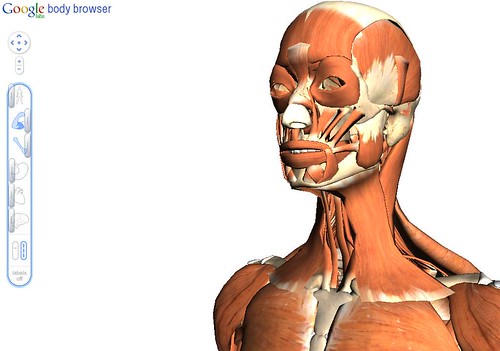
You can zoom across the globe with Google Earth. You can see the street view of Paris with Google Maps. You can search any term across the web with Google.
Today, you can explore the amazing human body with Google Body Browser. When you're done reading this, head on over and explore away.
Things I love about it:
- You can select layers such as the skeleton, the muscular system, the nervous system, the organs, the nervous system, or the circular system.
- You can pan and zoom from any angle
- You can layer one layer with another. For example you can show the skeleton, and layer the muscular system over it at, say 10%, to see how the muscles attach themselves and work.
- You can add labels to any part of the body to have Google Body Browser show you what you are looking at.
Saturday, December 18, 2010

Wednesday, December 15, 2010
Pretty Cool, Google!
Below are three screen shots of them showing whitehalldaycare.com (the site we use for our daycare in adwords). Pretty impressive Google.
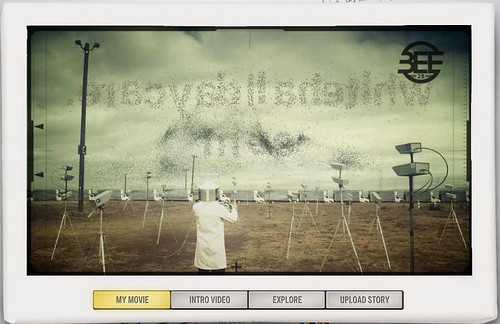
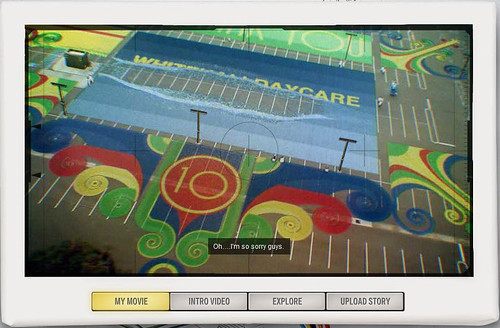

The whole video can be seen here:
www.youtube.com/adwords10?x=31488ee382f54f2d99390b026ccff694